Waiting for a government scholarship, PM-KISAN instalment, or any DBT benefit can be stressful. The Public Financial Management System (PFMS) is the digital backbone that ensures every rupee reaches your bank account transparently. As of 2026, PFMS offers real-time tracking without requiring you to remember any password or create a login.
This guide walks you through everything – from checking your PFMS Payment Status to tracking PFMS Scholarship disbursements – using the official PFMS NIC IN portal.
How to Check PFMS Payment Status (3 Easy Methods – No Login Required)
You can track any government payment – whether it is a scholarship, MGNREGA wage, or PM‑KISAN – using any of the three methods below.
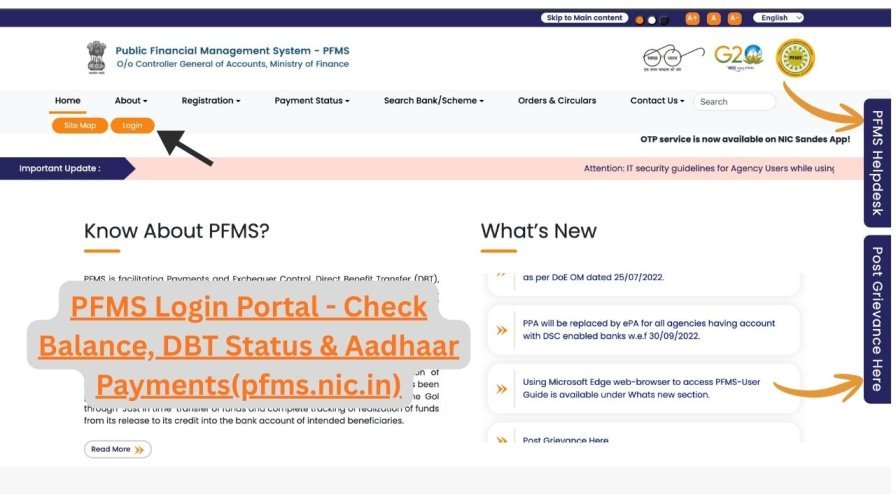
Method 1: By Bank Account Number (Most Common)
- Visit the official website: https://pfms.nic.in/
- Hover over the “Payments” tab and click “Know Your Payments”.
- Select “Search by Account Number”.
- Choose your Bank Name from the dropdown list.
- Enter your bank account number twice (confirmation).
- Solve the CAPTCHA and click “Search”.
What you will see:
A complete transaction history of all government payments credited to that account – including date, scheme name, amount, and unique Payment ID (PID).
Method 2: By Aadhaar Number (For Linked Bank Accounts)
- On the “Know Your Payments” page, select “Search by Aadhaar Number”.
- Enter your 12‑digit Aadhaar number.
- Select the bank linked to that Aadhaar.
- Complete CAPTCHA and search.
💡 This method is ideal if you have multiple bank accounts or have changed your account recently.
Method 3: DBT Real‑Time Status Tracker (For a Specific Application)
When you want to know the exact stage of a pending payment (e.g., scholarship application):
- On the PFMS homepage, click the “DBT Status Tracker” link (visible under the “Payments” section).
- Enter your Application ID (from NSP or scheme portal) or Beneficiary Code.
- Provide your registered bank account number.
- Solve CAPTCHA and click “Track”.
The system will show the complete payment journey:
- “Validated” → “Approved” → “Payment Initiated” → “Success / Failed” (with failure reason).
PFMS Scholarship Tracking 2026 – For Students
Every year, crores of students receive pre‑ and post‑matric scholarships, merit‑cum‑means scholarships, and state‑sponsored educational grants via PFMS. The platform is fully integrated with the National Scholarship Portal (NSP).
How to Track Your Scholarship Payment
- Go to pfms.nic.in → “Know Your Payments”.
- Use Method 1 (Bank Account) or Method 2 (Aadhaar) as described above.
- Your scholarship disbursement history will appear instantly – no separate student login is needed.
What’s New in 2026 for Scholarship Beneficiaries?
- Auto‑reconciliation between NSP and PFMS – once your application is approved on NSP, PFMS automatically triggers payment within 48 working hours.
- Real‑time SMS & Email alerts – you receive “Payment Initiated” and “Amount Credited” notifications.
- Integrated grievance redressal – if a payment fails due to an incorrect account or Aadhaar mismatch, you can raise a complaint directly through the PFMS portal’s grievance module.
Popular scholarships disbursed via PFMS:
- Post‑Matric Scholarship (SC/ST/OBC)
- Central Sector Scholarship (CSS)
- Merit Cum Means Scholarship for Minorities
- National Means‑cum‑Merit Scholarship (NMMS)
PFMS DBT (Direct Benefit Transfer) – What You Should Know
DBT ensures that subsidies and welfare payments go straight into your bank account. PFMS is the engine that powers DBT for more than 300+ central schemes including:
- PM‑KISAN (farmer income support)
- PM Ujjwala Yojana (LPG subsidy)
- Awas Yojana (housing assistance)
- Scholarship schemes (as above)
How to Check PFMS DBT Status
Use the same “Know Your Payments” tool. The status messages you may see:
| Status on PFMS | Meaning | What to do |
|---|---|---|
| Payment Initiated | Money has been sent to your bank | Wait 24‑72 working hours |
| Payment Successful | Credited to your account | Check bank statement / app |
| Account Validation Failed | Name / Aadhaar / IFSC mismatch | Contact scheme nodal officer |
| Payment Rejected | Eligibility or document issue | Check with the scheme department |
⏱️ Typical timeline: After “Payment Initiated” appears, the amount usually reflects in your bank within 3 working days. During high volume months (March, September) it may take up to 7 days.
PFMS Login for Government Officials Only (Not for Beneficiaries)
Beneficiaries (students, farmers, pensioners) do not need a PFMS login. The login is reserved for:
- Drawing & Disbursing Officers (DDO)
- Treasury officers
- State & central department users
- Scheme implementing agencies
If you are an authorised government official, here is the 2026 login procedure:
- Visit pfms.nic.in and click the “Login” button (top‑left).
- Select the current financial year (2026‑27).
- Enter your department‑issued Username and Password.
- Complete Multi‑Factor Authentication (MFA) – OTP on registered mobile + CAPTCHA.
- Click “Sign In” to access your dashboard (pending approvals, fund utilisation reports, etc.).
Forgot Password or New Registration?
- Forgot password: On the login page, click “Forgot Password” → Enter Login ID → verify via OTP/security question → set new password.
- New user registration: Click “Registration” on the homepage → download the form → fill accurately → submit to your department’s nodal PFMS officer. Credentials are issued after manual verification.
Official PFMS Helpline & Support (2026)
| Support Channel | Details | Remarks / Timings |
|---|---|---|
| Official Website | https://pfms.nic.in/ | Always check for .nic.in domain. Do not use fake or third-party sites. |
| National Helpdesk Number | 011-23343860 | Mon–Fri |
| Official Email Support | helpdesk-pfms@gov.in | Use for scheme payment issues, account validation failures, and technical queries. |
| In‑Portal Grievance (Public) | Available under “Grievance” section on the PFMS homepage | Beneficiaries can raise complaints without login (e.g., payment not credited). |
| In‑Portal Grievance (Registered Officials) | Inside the PFMS dashboard after login | For DDOs, treasury officers, and scheme nodal officers only. |
Frequently Asked Questions (FAQs)
Q1. How do I check PFMS payment status without a login?
Visit pfms.nic.in → “Know Your Payments” → enter bank account number or Aadhaar → CAPTCHA → Search. No login required.
Q2. My PFMS status shows “Paid” but money not credited. What should I do?
Wait for 72 working hours. If still not credited, visit your bank branch with the Payment ID (PID) shown on PFMS. If the bank has no record, contact the scheme’s implementing agency.
Q3. Can I track my NSP scholarship on PFMS?
Yes. Use the “Know Your Payments” tool with the bank account linked to your NSP application or with your Aadhaar number.